


A calm, offline
computer for kids

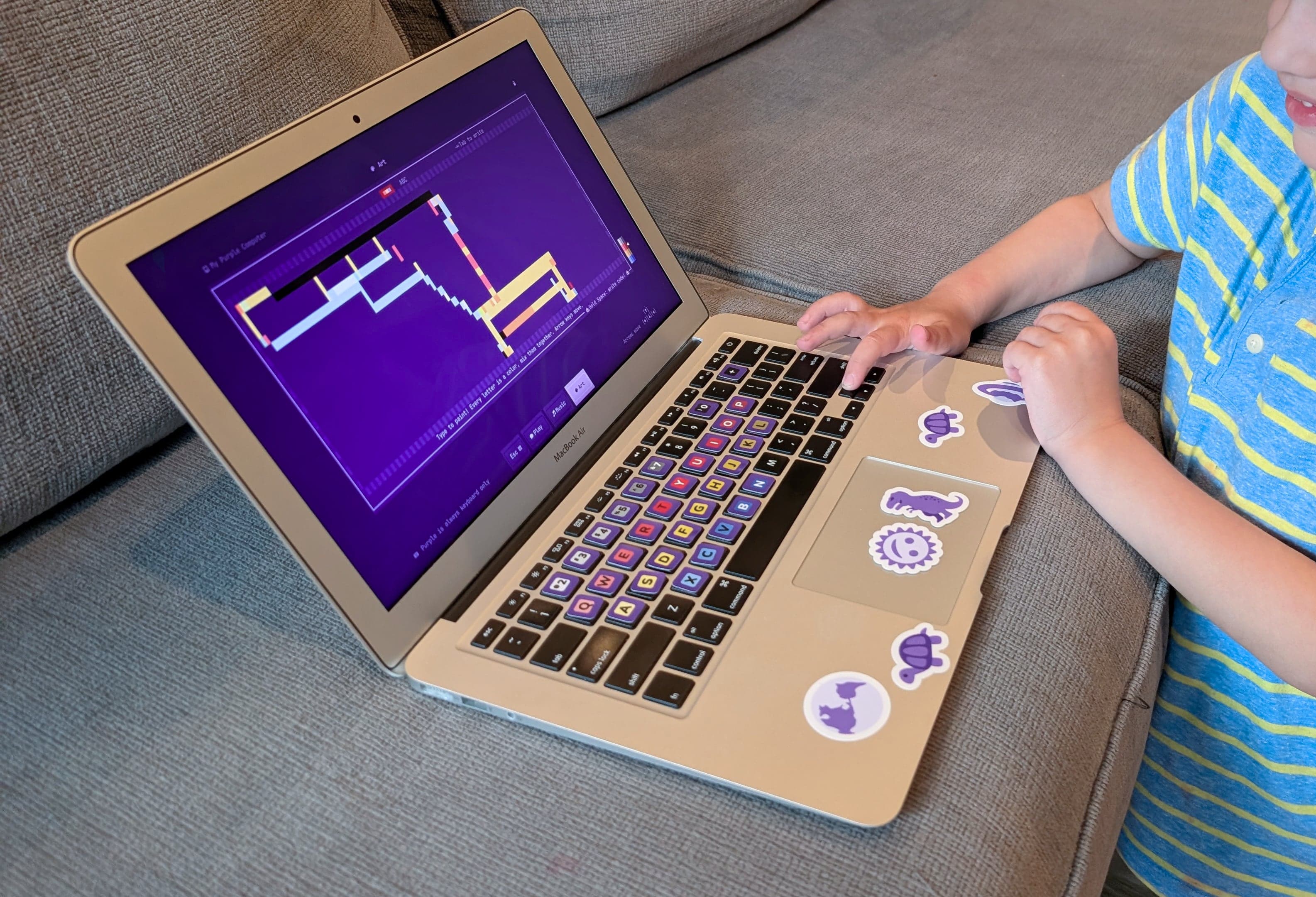
Child using Purple Computer on a couchDesigned for ages 3-10

Transform your old laptop into an offline space for open-ended play

A whole computer that's fully theirs

no wrong keys to press

and they put it down on their own

Full refund anytime, nothing to returnPay once and it's yours: no subscription, no trackingUse it on as many laptops as you like
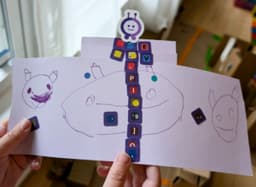
A paper creation a kid made for Purple: drawings with the letter stickers and the Purple bot on top

“Daddy, I made this stuff for Purple! Can we put it on the website?”

See what's on it →

Got an old laptop?

Not sure? Every order has a full refund →

Built by Tavi Nathanson, a software engineer and dad of two who wanted a calm first computer for his 4-year-old.

Our story →

They explore, draw, and make music.

Sometimes they get bored and walk away. No tantrum!

They're learning what's possible with a computer, the way we did as kids.

See what it looks like

Like the computer
you grew up with

Computers are a big part of their future. Purple lets them start the way we did: open-ended play, pressing buttons, making things of their own.

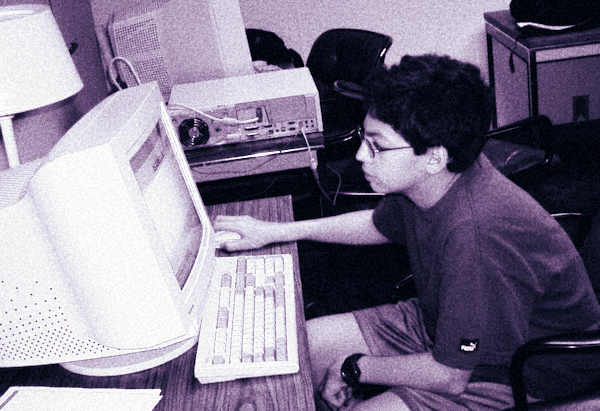
Kid using a computer in the early 2000s

Tavi, circa 2000.

Completely offline

A secure sandbox for unsupervised exploration. No internet, no app store, nothing to break.

They figure it out themselves

Learning by poking around and experimenting.

A screen they walk away from

No tantrums, no parental controls needed.

Calm by design

Purple never grabs for their attention. It can even be a little boring! Kids need to put something in to get something out.

Freedom to explore a computer the way we were able to.

What's on it

3 rooms to explore

Three ways to build and explore in Purple, from a 3-year-old learning letters to a 10-year-old writing code.

Type words, math, emojis, and colors, and watch them come to life. Purple can read any word out loud if you want.

Try:

say hello therered + blue5 x 3 dinos

And when they're ready, real code

In Music or Art, hold Space to open Code Space and write real code: repeat 4: forward 10 green turn.

Coding in Purple is inspired by the Logo turtle.

Just a keyboard

No mouse, no touchscreen, just buttons to press.

100s of emojis and colors

Periwinkle, chartreuse, narwhals, dragons, and more.

Real math

Counted out in dots or emojis, an abacus for big numbers, and skip counting like 3, 6, 9.

Built for little hands

Forgiving spelling and math, sticky shift, no errors ever.

That's the short version. See everything Purple can do

Skills map

What they pick up along the way

Purple doesn't have lessons or guided instruction, but learning finds a way! Some stuff that kids pick up:

It's mine

I can

  • turn it on by myself
  • press any button and see what happens
  • do whatever I want on it, nothing is off limits
  • put it away myself when I’m done

I make stuff

I can

  • draw a picture with colors and letters
  • make a song with instruments
  • mix colors together
  • draw with simple code commands

I type stuff

I can

  • find all the letters
  • press a letter and hear it
  • type my name and hear it read back
  • type 5 x 3 dinos and count them

The longer version: what they're learning

From parents

Purple is the most refreshingly old school tech toy for kids, that gives my parent screen time angst a break. It's open ended, accessible and interesting for my 5 year old. Importantly for me, it hits the right balance of fun and those frustrated-figure-it-out-yourself discovery moments that I remember myself and want for my kids.
Dr. Karlyn BeerEpidemiologist and mom of two
As a parent working in IT I worry about balancing my children's safety by exposing them to tech versus raising them sheltered under a rock and having them be behind their peers when they enter the workforce. This Operating System is the perfect blend! My kids get to learn all of the hardware things of computers like typing, volume controls, coding syntax, and critical thinking all without being connected to the internet at all!
Waldo K.IT engineer and dad of two
Purple Computer has been awesome! My 5yo keeps stumbling onto new things: recording and looping her own music, finding out that an exclamation mark makes the computer speak what she types, even accidentally writing music with code! It's offline by design, so the whole environment is hers to explore.
Isaac SungSoftware engineer and former computer science professor, dad of two
Colorful paint mixing with a brush

Colors mix like real paint.

Each letter maps to a shade of a primary color, so kids mix them just like paint: their own purples, greens, and oranges.

Same key, same color in every room, matching the keyboard stickers in the box. See the color map

Simple setup

  1. We mail you a Purple Key (USB drive), setup cards, and stickers.
  2. Plug it into your old laptop and follow a few quick steps.
  3. Purple starts up, right from the Purple Key.
  4. Hand it over!

No tech skills needed.

What's in the box?

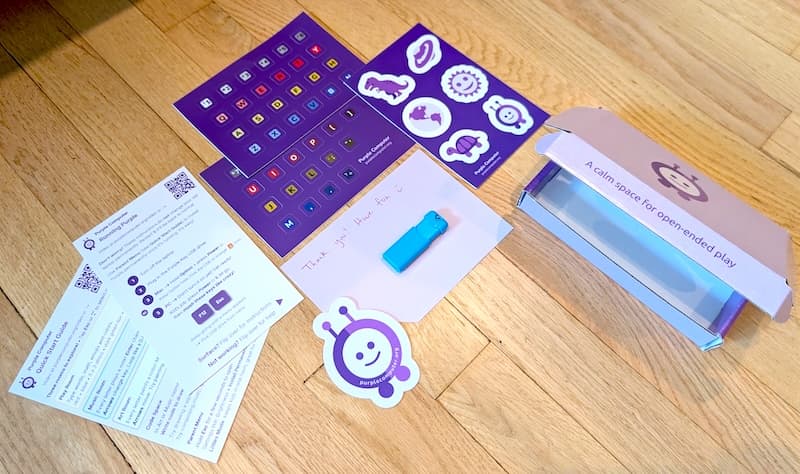
When that Purple Key arrives in the mail, here's everything that comes with it.

The Purple box and what comes inside

Keyboard key stickers

Each key is colored to match the color it makes on screen.

Purple stickers

A whole set, from a purple T-rex to a purple planet, to make the laptop their own.

Instruction cards

Simple steps to get set up and exploring.

Purple Key

Your USB drive that turns any laptop into Purple.

Not the right fit? Keep the box. There's nothing to return.

Give your old laptop a second life

Your old laptop still works. To your kid, it's a hand-me-down from a legend!

And Purple is so simple that it runs great on .

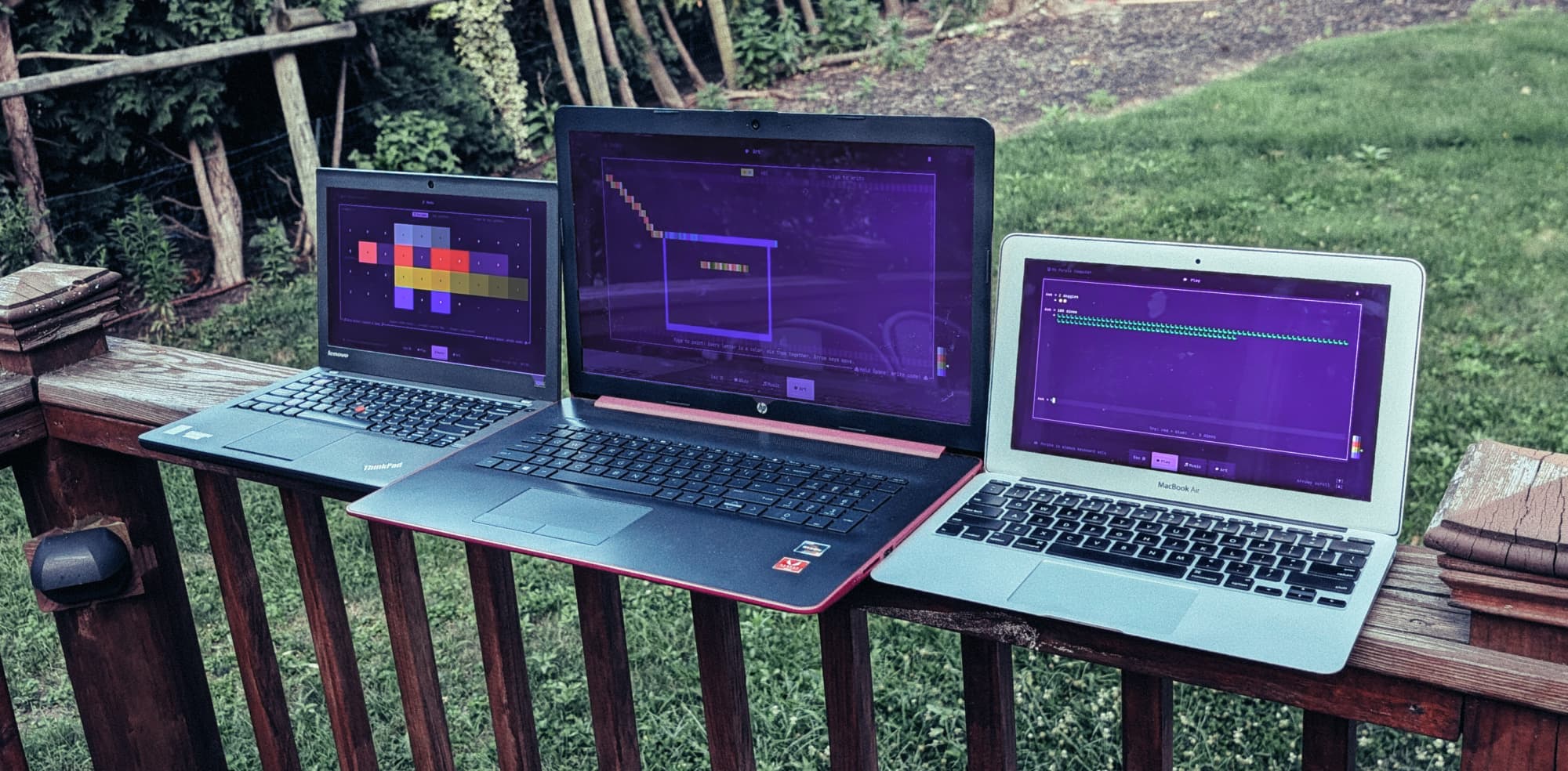
A ThinkPad, an HP, and a MacBook Air side by side on a deck railing, each running a different Purple room

Three old laptops, all Purple Computers.

You can read the code

All of Purple is public on GitHub, so you can see exactly what runs on your kid's laptop.

Tinker as much as you like on your own copy! Not quite open source though: more in the FAQ or on GitHub.

Read the code on GitHub
purple_tui/rooms/art_room.py
ROW_LEGEND_COLORS = [
    # Gray (number row, grayscale): light → dark
    ["#C0C0C0", "#808080", "#404040"],
    # Red (QWERTY row): light → dark
    ["#DF7070", "#BF4040", "#802020"],
    # Yellow/gold (ASDF row): light → dark
    ["#DFC070", "#BFA040", "#806820"],
    # Blue (ZXCV row): light → dark
    ["#7090DF", "#4060BF", "#203080"],
]

Our story

How Purple came to be

My 4-year-old and I liked to "computer code" together on my laptop: typing words to see emojis, mixing colors, making sounds. Eventually he wanted his own. He has his own rolling pin, his own snow shovel: why not a computer?

So I took my wife's old laptop and turned it into one. At first it was just a purple terminal. That's where the name came from.
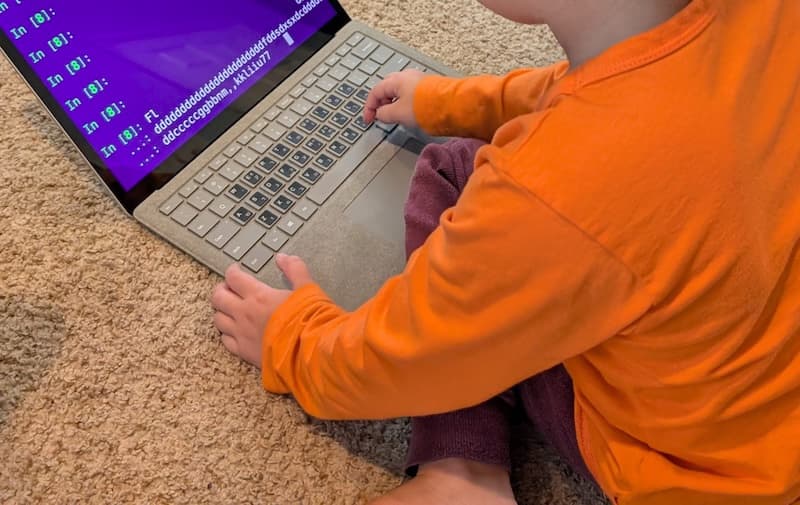
The first version of Purple: an old laptop showing a plain purple terminal

The first version, when it was just a purple terminal.

Type "trex" x 3 and see 🦖🦖🦖. Press any key and hear a sound.

It felt different than "screen time": just exploring and creating. He'd use it for a while, then walk away on his own. The self-regulation dream. We built it out more, and he and his sister have been my beta testers!
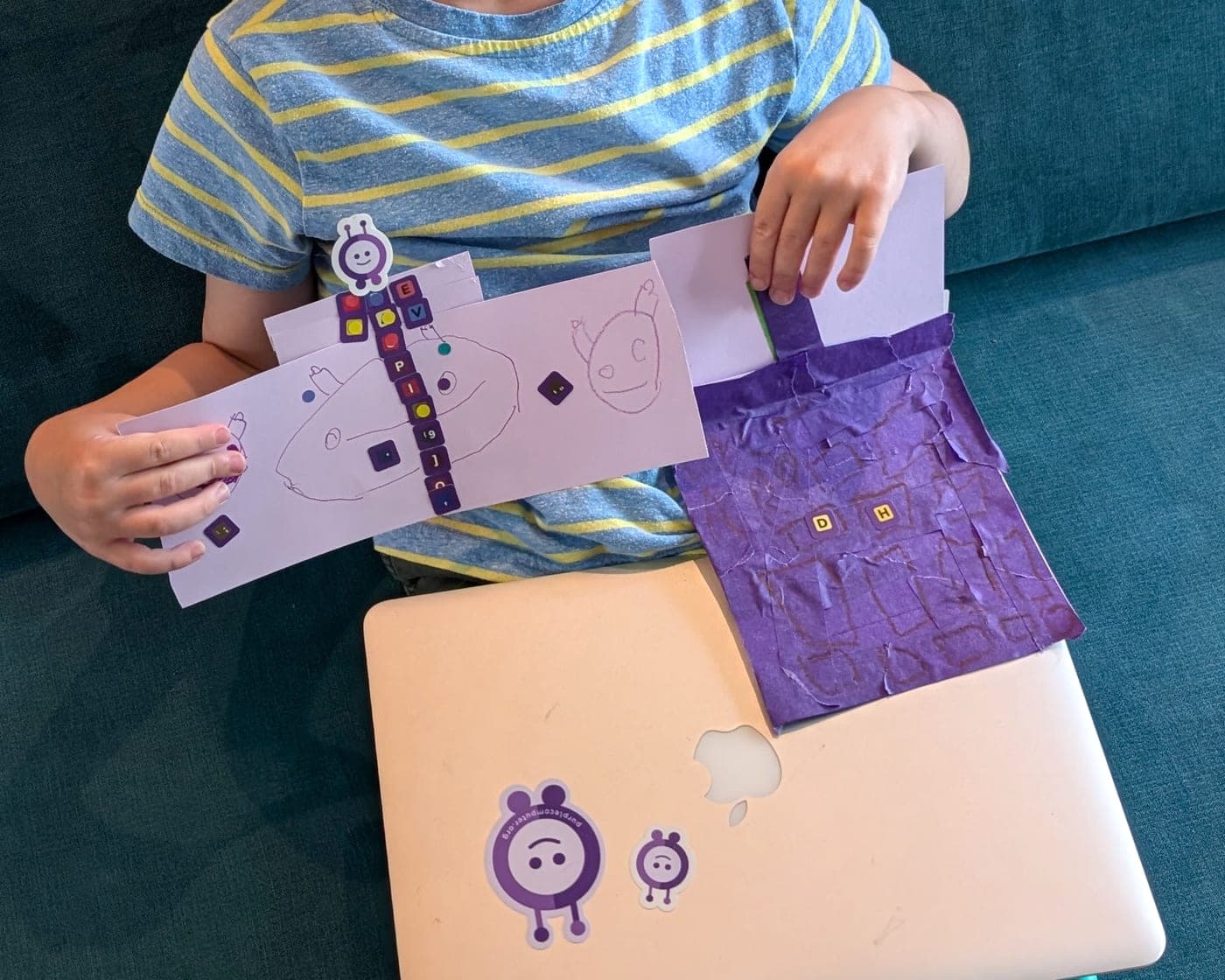
A kid holding up a Purple Computer made of paper: a tissue-paper laptop with letter stickers for keys, and a hand-drawn sign, sitting on a real laptop running Purple

“Daddy, I made this stuff for Purple! Can we put it on the website?”

— Tavi, dad of two

Team

Software engineer and dad of two young kiddos. Can't wait for them to go to bed, but then scrolls through photos of them after bedtime. Recently realized pistachios are tasty.

Resident Dinosaur Expert

Age 5. Likes dinosaurs, space, and science experiments. Can count to 1,442. Regular user of his own Purple Computer, but he doesn't actually pick it up every day. That's the point!

Common questions

Still have a question?

Ask anything. We're a small team and we'll email you back.

Or just email tavi@purplecomputer.org

Join a growing community

Kids are already using Purple Computer in 47 states!

AlaskaAlabamaArkansasArizonaCaliforniaColoradoConnecticutWashington, DCDelawareFloridaGeorgiaHawaiiIowaIdahoIllinoisIndianaKansasKentuckyLouisianaMassachusettsMarylandMaineMichiganMinnesotaMissouriMississippiMontanaNorth CarolinaNorth DakotaNebraskaNew HampshireNew JerseyNew MexicoNevadaNew YorkOhioOklahomaOregonPennsylvaniaRhode IslandSouth CarolinaSouth DakotaTennesseeTexasUtahVirginiaVermontWashingtonWisconsinWest VirginiaWyoming

Full refund, anytime.

Try it at home. Decide later.

A lot is hard to know up front: whether it'll be a hit, or even whether that old laptop is still in your closet. Zero risk in trying.

Refund anytimeeven a year later
No questionsjust email us
Keep the boxnothing to ship back

Not a fit? Just email tavi@purplecomputer.org and we'll take care of it.

Why full refunds anytime? Purple is a small family business, and we're in it for happy customers. Mailing a box back is a hassle for everyone, so you keep it.

Get Purple

We mail you a Purple Key. You plug it in. Done!

Purple Key

Turn your old laptop into Purple

A USB drive that transforms your laptop, plus keyboard and Purple stickers to make it feel like theirs.

$95once, free shipping

One purchase, use it on as many laptops as you like.

Full refund anytime, nothing to return.